Serenity 10.9.0 Release Notes (2026-11-28)
These release notes detail the changes made in Serenity and StartSharp from version 10.8.0 to 10.9.0. For a complete list of changes, please refer to the Serenity Change Log.
Most of this release is about the accounts of an application and the administrators who look after them:
- Accounts that can defend themselves. Sensitive actions ask for the password again, and let the users confirm with a linked external login instead; sessions can be ended everywhere; an account can be required to change its password and set up two-factor authentication; the users are told by email when their account changes; and administrators invite new users instead of setting a password for them. The sign-ins and the changes are recorded in an activity log, and an administrator can sign in as a user in the same browser to help them.
- An administration console. A new exception log replaces StackExchange.Exceptional, and the Roles and User Management pages replace their grids and dialogs, with a permission tree, per-user tabs and two-factor recovery. Super admins come from the settings, and an administrator can grant only what the permission grant rules allow.
- Smaller changes across the framework. Upload editors drop their toolbars for a drop box, switches are larger, grids cope better with phones, and the pages of the feature assemblies get a text root of their own. The 10.8.1 patch release in between fixes several regular expressions that could hang the application or the build, see 10.8.1.
A New Exception Log (StartSharp)
StartSharp no longer uses StackExchange.Exceptional to log errors. Exceptional stored one row per error, with no way to tell how often the same error happens, to whom, since which release, or whether someone is already looking at it. The new exception log of Pro.Extensions groups the errors into issues, keeps the database small, and has a page of its own in the Administration menu.
Issues and Events
An issue is one kind of error of an application: the exceptions with the same type that come from the same method, which is the first frame of the stack trace in the application's own code, e.g. StartSharp.Northwind.OrderSaveHandler.SetInternalFields. Each issue has:
- a status: unresolved, resolved or ignored. A resolved issue that fails again becomes unresolved and is marked regressed;
- the times and releases it was first and last seen, and how many times it happened;
- hourly counters, for its charts and for the breakdowns by environment, release and machine;
- its latest events (20 by default), each with the message, the user, the request (method, address, query, form, headers and cookies), the browser and the server.
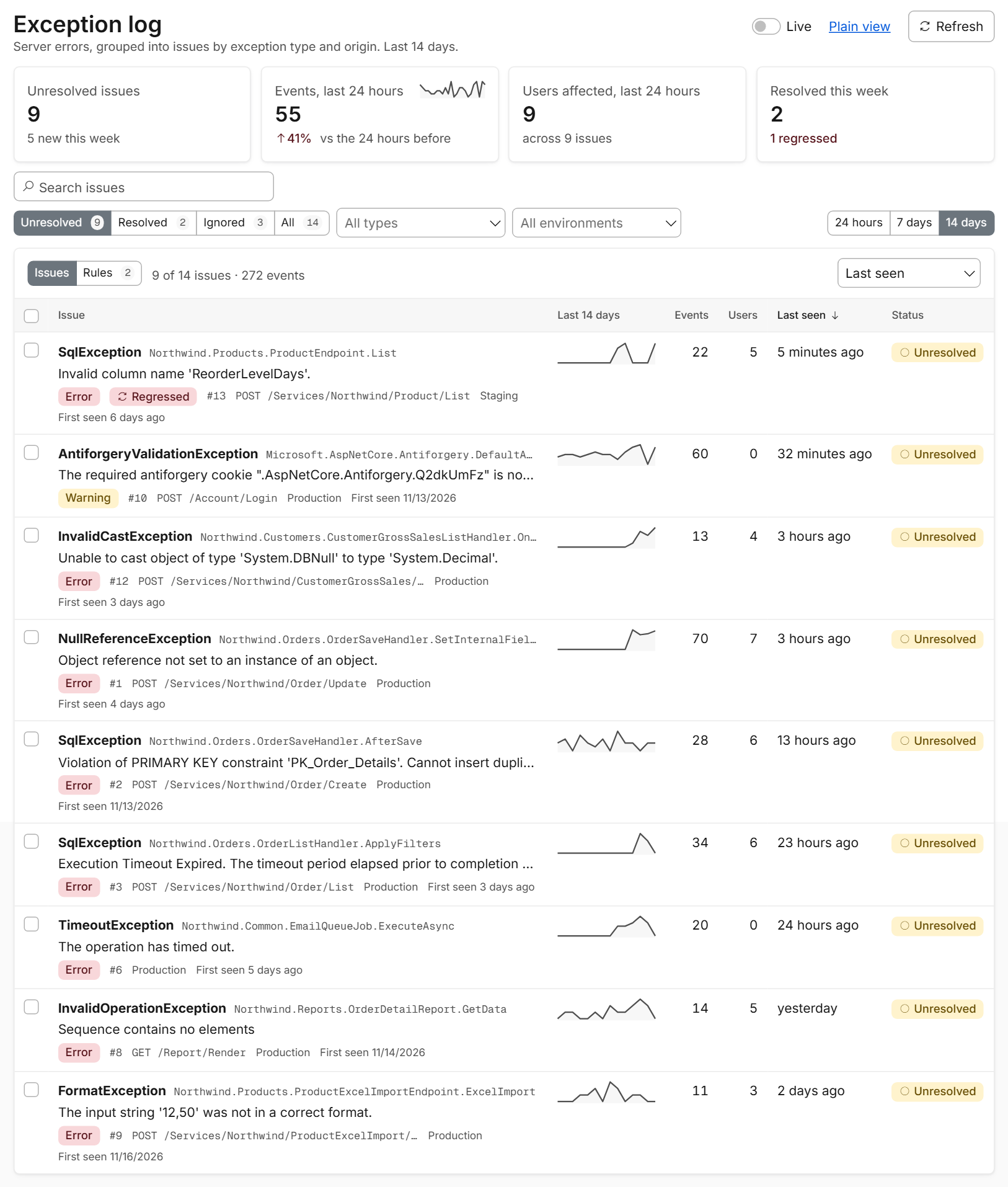
The exception log page lists the issues of the last 24 hours, 7 days or 14 days with a daily chart for each, the key figures above them (unresolved issues, events and users of the last 24 hours, resolved issues of the week), a search, and filters by status, exception type, environment and, when several applications share the database, application. Issues can be resolved, ignored and deleted one by one or together, and the Live switch refreshes the list as new errors come in.
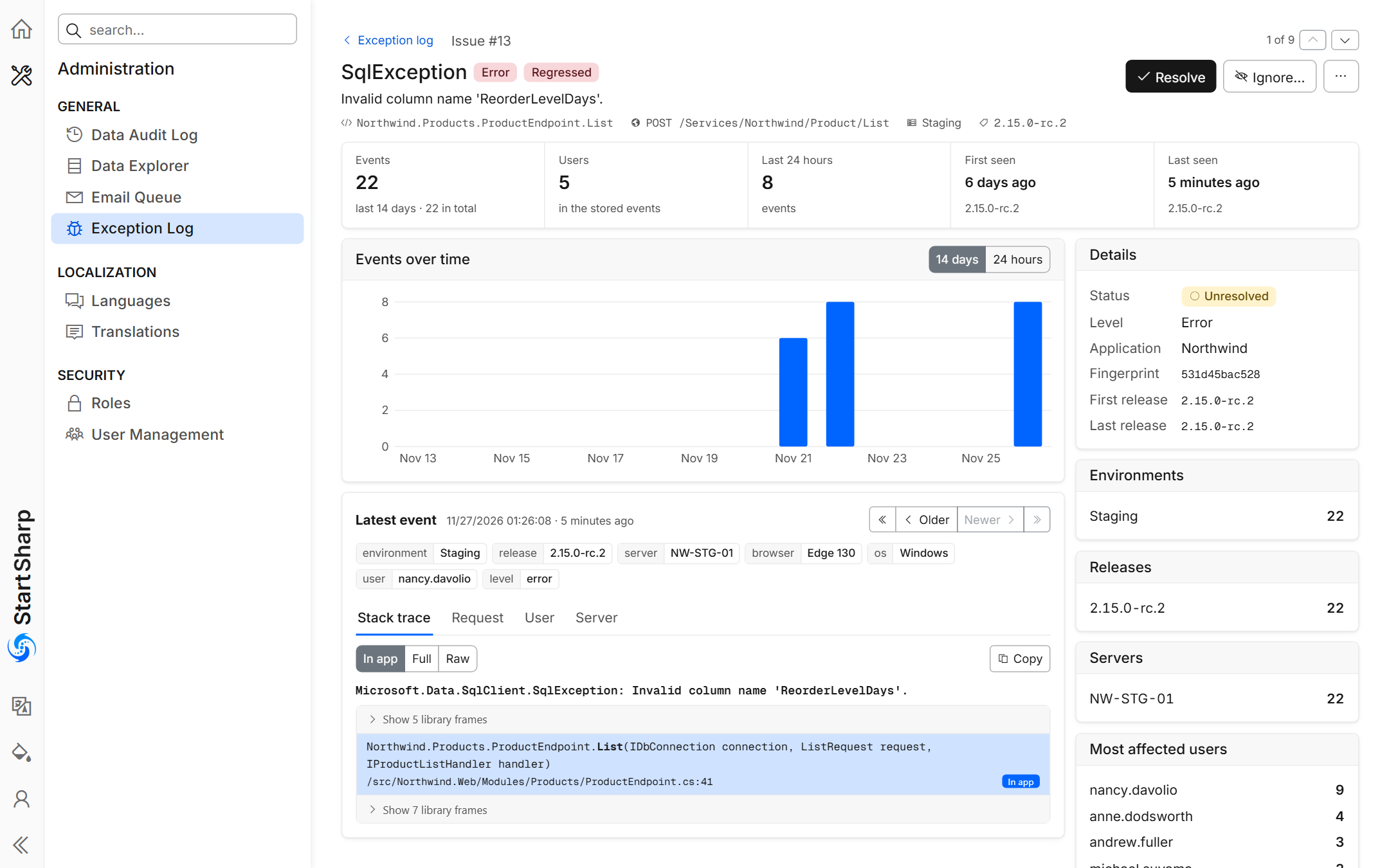
The page of an issue shows its charts and breakdowns, and its events one by one. The stack trace is folded to the application's own frames, with the library frames between them collapsed, and can also be shown in full or as plain text.
Keeping the Database Small
The exception log does not store the same thing many times:
- The stack trace is stored once per issue.
- Only the latest events of an issue are kept, while all of them are counted (
MaxEventsPerIssue, 20). - Repeats of the same error for the same user and address within a minute become one event with a count (
RollupSeconds, 60). - Events and counters older than 90 days are removed every 6 hours (
RetentionDays). Issues that a person ignored or gave a detail level stay, as they are rules.
The values of the form fields, query strings, headers and cookies whose names match MaskPattern, e.g. passwords, tokens and the authentication cookie, are replaced with [Filtered] before an event leaves the request. Exceptions of requests that the client aborted are not logged.
Errors are not written to the database while the request waits. They go into an in-memory queue that a background writer stores in batches, and that keeps them, up to QueueLimit (1000), while the database is not available. The page says when events are waiting and why.
Detail Levels and Rules
Some errors happen all the time and are not worth their space, e.g. an expired antiforgery cookie. How much of an error is stored is its detail level:
| Level | Stored |
|---|---|
Full |
the latest events with their request details |
Light |
the latest events without their request details |
CountOnly |
only the counters, so the charts and totals stay right |
Discard |
nothing, not even counted |
Rules give a detail level to the errors that match all their conditions, and can also ignore their issues: a new issue starts as ignored, and a resolved one that comes back stays ignored instead of becoming unresolved. A rule has one or more of these conditions:
- the exception type, as a full or short name, where
*matches any text, e.g.TaskCanceledExceptionor*.BadHttpRequestException; - a text that the message contains, ignoring case;
- the path of the request, where
*matches any text, e.g./Services/Northwind/Order/*; - the HTTP status code.
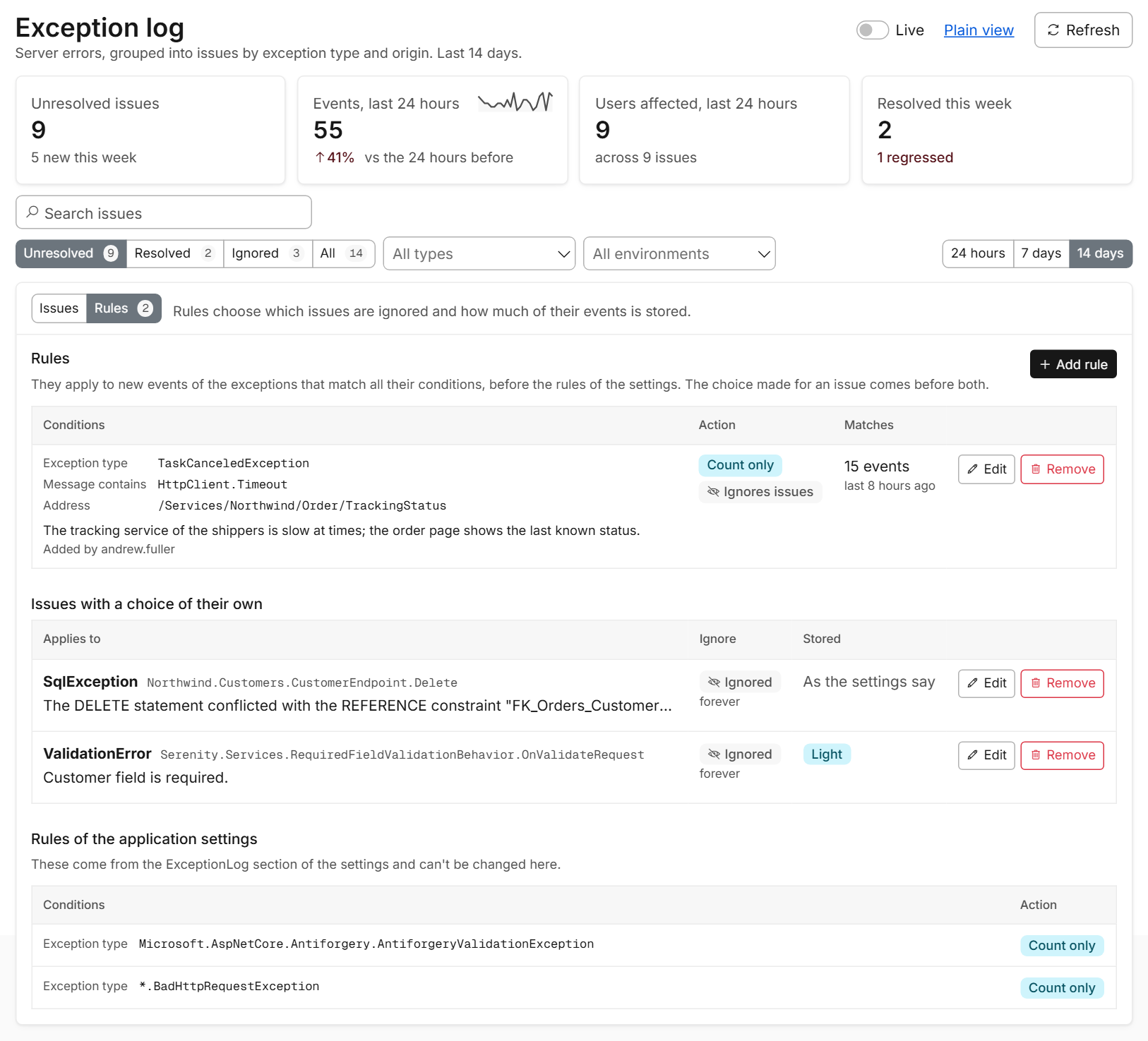
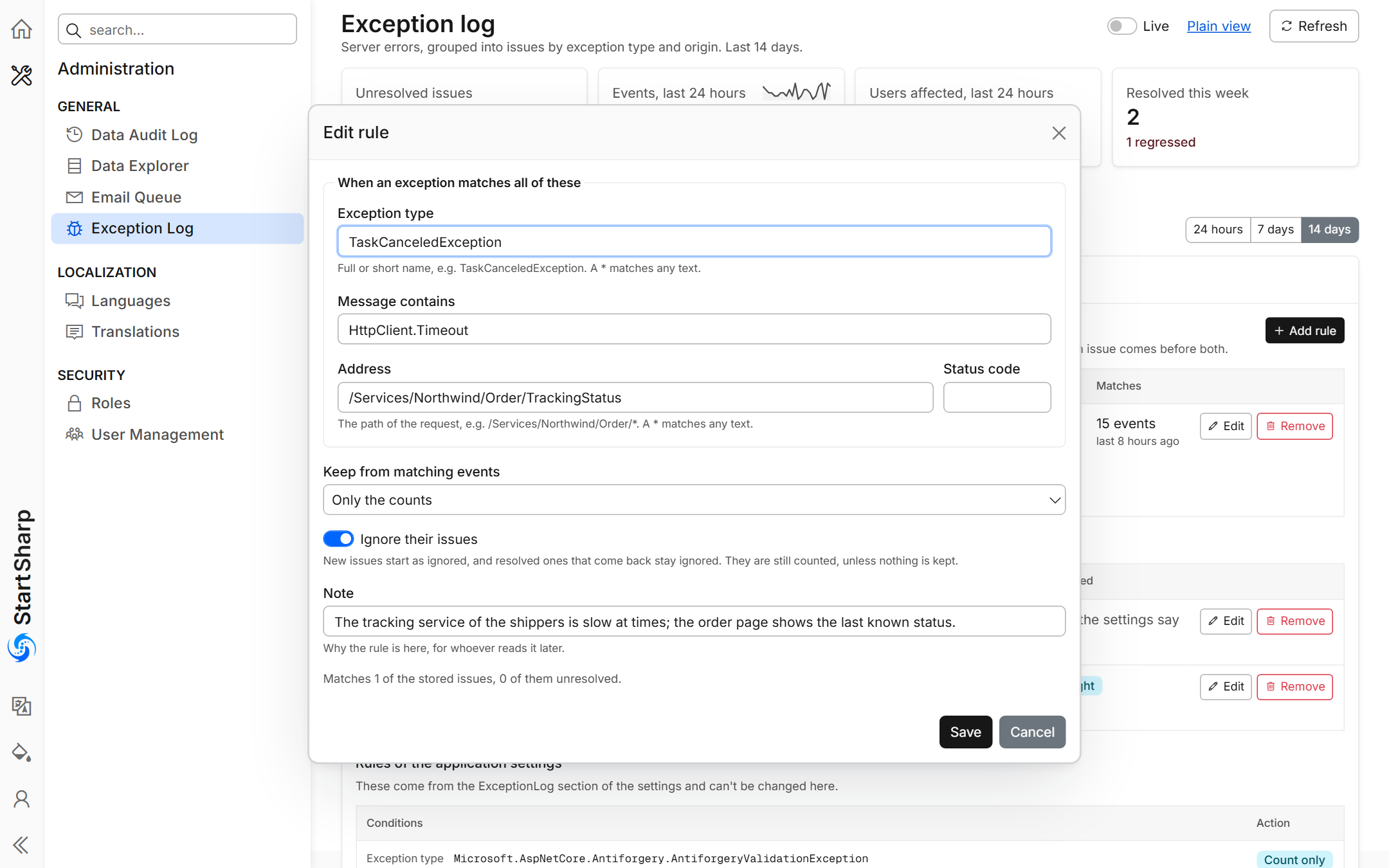
Rules can be added on the page, on the Rules view or from an issue (Add rule for similar…). The dialog tells how many of the stored issues a rule matches while it is edited, and can ignore the unresolved ones among them right away. The page shows how many errors each rule matched and when it last did. Removing a rule brings back the issues that it ignored.
Rules can also come from the settings, where they apply to every installation of the application:
"ExceptionLog": {
  "Rules": [
    { "Type": "TaskCanceledException", "Url": "/Services/*/TrackingStatus", "DetailLevel": "CountOnly", "IgnoreIssues": true },
    { "Message": "The client reset the request stream", "DetailLevel": "Discard" }
  ]
}
The built-in rules only count antiforgery and bad request errors (UseDefaultRules). A choice made for an issue on the page (Ignore… with Keep from new events) comes first, then the rules of the page, then the rules of the settings.
Error References
Each logged error has a reference, a key of 32 characters that is not sequential, so it can be shown to a user without telling how many errors there were. The error page of StartSharp shows it, and users who can see the exception log get a link to the error there. ExceptionLogWriter.GetEventKey(exception) returns the reference of a logged exception, and Administration/ExceptionLog#event/<reference> opens it.
The Plain Page
When the layout or the scripts of the application are what fails, the page itself may not work. Administration/ExceptionLog/Plain shows the exception log as a plain, read-only HTML page without the layout, scripts and styles of the application. When the database is not available, it shows the error of the store and the events that wait in memory.
The public demo shows made-up sample issues instead of the ones of its server, which visitors can resolve, ignore and add rules to, and which start over after 30 minutes (AddExceptionLogSampleData(), only in the demo and debug builds).
Settings
The exception log is configured in the ExceptionLog section of appsettings.json. All the settings are optional:
| Setting | Default | |
|---|---|---|
ConnectionKey |
ProExceptionLog |
The connection of the tables. Without a ProExceptionLog connection, the ProExtensions, ProFeatures and Default ones are tried in that order. |
ApplicationName |
the name of the application | Stored with each issue, for when several applications share the database. |
Environment |
the environment of the host | e.g. Production or Staging. |
Release |
the version of the application | The informational version of the entry assembly. |
ShowAllApplications |
false |
Lists the issues of all the applications that share the database, with a filter for them. |
MaxEventsPerIssue |
20 |
The events kept for each issue. |
RollupSeconds |
60 |
Repeats within this time become one event. 0 turns it off. |
RetentionDays |
90 |
Events and counters older than this are removed. |
MaxListedIssues |
2000 |
The issues the page reads, the most recently seen ones. When there are more, the page says so, and its lists and counts are about those. 0 for no limit. |
QueueLimit |
1000 |
The events that can wait in memory. |
InAppPrefixes |
the root namespace | The namespaces of the application's own code, e.g. StartSharp.. |
MaskPattern |
passwords, tokens, cookies, … | A regular expression for the names of the values that are not stored. |
IgnoreAbortedRequests |
true |
Drops the exceptions of requests that the client aborted. |
UseDefaultRules |
true |
The built-in rules for antiforgery and bad request errors. |
Rules |
none | See above. |
The tables are exc_Issues, exc_Events, exc_Counters and exc_Rules, which the migrations of Pro.Extensions create in the database of the connection. The prefix keeps them apart from the tables of the application.
Upgrading
An application that has not applied the template changes keeps working as before: AddExceptionLogger(connectionString), ExceptionLog and SqlErrorStore are obsolete but still log to the Exceptions table with Exceptional. They, and the StackExchange.Exceptional package, will be removed in a later version.
To switch to the new exception log:
In
Startup.cs, callAddExceptionLoggerwithout a connection.app.UseExceptionLogger()stays as it is.// before services.AddExceptionLogger(Configuration.GetDataConnectionString(DefaultConnectionAttribute.Key)); // after services.AddExceptionLogger();Delete
Modules/Administration/User/ExceptionLogPage.cs, and add the page, its script and its endpoint underModules/Administration/ExceptionLog:[PageAuthorize(PermissionKeys.ExceptionLog)] public class ExceptionLogPage : Controller { [Route("Administration/ExceptionLog")] public ActionResult Index([FromServices] IOptions<ExceptionLogOptions> options) { return this.PanelPage(ESM.ExceptionLogPage, ExceptionLogPageTexts.Title, new { showAllApplications = options?.Value?.ShowAllApplications ?? false, plainUrl = "~/Administration/ExceptionLog/Plain" }); } [Route("Administration/ExceptionLog/Plain")] public ActionResult Plain([FromServices] ExceptionLogPlainPage plainPage, long? issue = null, int? @event = null, string? key = null) { var pageUrl = Url.Content("~/Administration/ExceptionLog/Plain"); var normalUrl = Url.Content("~/Administration/ExceptionLog"); Response.Headers.CacheControl = "no-store"; return Content(issue == null && string.IsNullOrEmpty(key) ? plainPage.RenderList(pageUrl, normalUrl) : plainPage.RenderIssue(issue ?? 0, @event, pageUrl, normalUrl, key), "text/html; charset=utf-8"); } }// ExceptionLogPage.ts import { panelPageInit } from "@serenity-is/corelib"; import { ExceptionLogPage } from "@serenity-is/pro.extensions"; import "@serenity-is/pro.extensions/pages/exception-log.css"; export default (options?: any) => panelPageInit(ExceptionLogPage, options);The endpoint (
ExceptionLogEndpoint.cs, routeServices/Administration/ExceptionLog/[action], authorized withPermissionKeys.ExceptionLog) has theList,Retrieve,Update,Delete,SaveRuleandDeleteRuleactions, which call the same methods ofIExceptionLogHandler, passingUser.Identity?.NametoUpdateandSaveRule.In
AdministrationNavigation.cs, dropTarget = "_blank"from the Exception Log link, as the page is part of the application now. The template also changes its icon tofa-bug.Delete the
DefaultDB_20161029_1300_ExceptionLogmigration, which created theExceptionstable. The new log does not read that table, which can be dropped once its errors are no longer needed.Optionally, show the reference of the error on
Views/Shared/Error.cshtml:@inject Serenity.Abstractions.IPermissionService Permissions @{ var errorReference = ExceptionLogWriter.GetEventKey( Context.Features.Get<Microsoft.AspNetCore.Diagnostics.IExceptionHandlerFeature>()?.Error); } @if (errorReference != null) { <p>Reference: <code>@errorReference</code></p> } @if (Permissions.HasPermission(StartSharp.Administration.PermissionKeys.ExceptionLog)) { <p><a href="~/Administration/ExceptionLog@(errorReference == null ? "" : "#event/" + errorReference)">Open the exception log</a> to see what went wrong.</p> }
Roles Page (StartSharp)
The Roles page replaces the grid of roles and the permission dialog. The roles are on the left with their member counts, and the selected role is on the right, with its permissions and its members on two tabs.
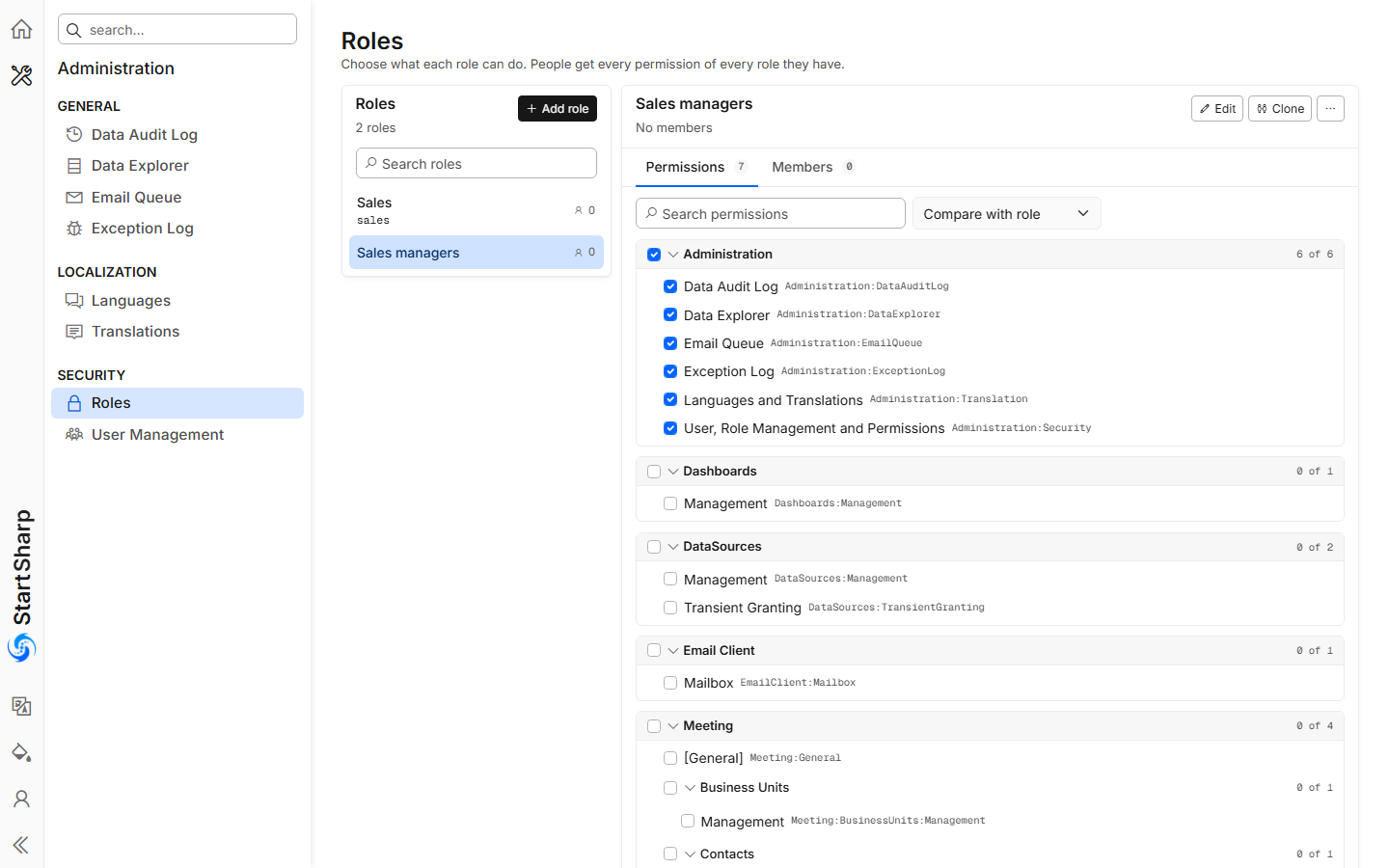
- The permissions are a tree of the groups of their keys, e.g. Administration and Northwind, with a search, a checkbox that grants or removes a whole group, and the number of granted permissions of each. A permission that another granted one implies (see
ImplicitPermissionAttribute) says so, and can still be granted on its own. - The key of a permission, e.g.
Administration:Security, is a hint of its name, as the users don't need it; it is shown next to the name when the search finds the permission by its key. - Changes are kept as unsaved changes, with a bar to save or discard them, and the page asks before they are lost, e.g. when another role is selected.
- Compare with role marks the permissions that only one of the two roles has, and Only differences shows just those.
- Clone creates a role with the saved permissions of the selected one. Copy permissions from… adds the permissions of another role to the unsaved changes, or replaces them.
- The Members tab lists the users of the role, and adds or removes them.
- The selected role is kept in the address, e.g.
#role/3, so a link opens it.
Deleting a role that had permissions or members failed because of their foreign keys. The delete handler of the template now removes them with the role.
Upgrading
The page comes from Pro.Extensions (RolesPage), and the template only hosts it and provides the services it calls:
Replace
RolePage.tsxwithRolePage.ts, and return a panel page fromRolePage.cs:import { panelPageInit } from "@serenity-is/corelib"; import { RolesPage } from "@serenity-is/pro.extensions"; import "@serenity-is/pro.extensions/pages/roles.css"; export default (options?: any) => panelPageInit(RolesPage, options);return this.PanelPage(ESM.RolePage, RoleRow.Fields.PageTitle());Add the member count to
RoleRow:[DisplayText("Members"), Expression("(SELECT COUNT(*) FROM [UserRoles] ur WHERE ur.[RoleId] = t0.[RoleId])")] public partial int? MemberCount { get; set; }Add
RoleMembersRequest(RoleId,UserIds) and theListMembers,AddMembersandRemoveMembersactions toUserRoleEndpoint, with their methods inUserRoleRepository.ListMembersreturns theUserId,UsernameandUser(display name) of the members.Override
OnBeforeDeleteAsyncinRoleDeleteHandlerto delete theRolePermissionsandUserRolesrows of the role.Delete
RoleGrid.tsx,RoleDialog.tsx,RoleForm.cs,RoleColumns.cs,RolePermissionDialog.tsxandRolePermissionDialogTexts.cs, unless your application changed them and wants to keep them.
The service names can be changed with the options of the page (roleService, permissionService, memberService, userService, permissionKeysScript and implicitPermissionsScript).
User Management Page (StartSharp)
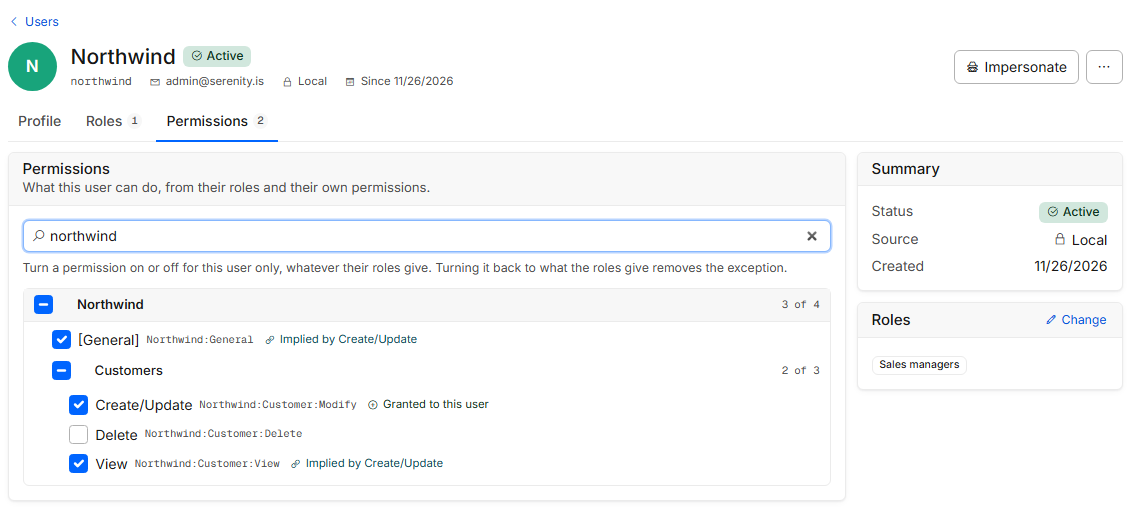
The User Management page replaces the grid of users, the user dialog and the user permission dialog. The list shows the users with their roles, status, two-factor authentication, source and creation date, and opens the page of a user, with its profile, roles and permissions on three tabs.
- The list is a Serenity grid that loads the next users as it is scrolled (
InfiniteScrollView). On a phone, it is as high as its rows, and the page scrolls and loads them. It filters by status (all, active, deactivated, with counts), role and two-factor authentication, searches the name, username and email, and sorts by any column but the roles. The super admins have a badge, and the username is shown under the name when it is neither the display name nor the email. - The two-factor column and filter are for those who can see the two-factor status (
Administration:Security, thetwoFactorPermissionoption). - The Profile tab shows the form of your user entity (
Administration.User), so the fields, editors and rules of your application work as they did in the dialog. Add user shows the same form in a dialog. - The Roles tab lists the roles with a checkbox for each, and links to their permissions on the Roles page.
- The Permissions tab shows the permission tree of the Roles page, with a three-state control for each permission, which a click turns from what the roles give, to granted to the user, to revoked from the user, and back. Its color tells where the permission comes from: blue for a role, teal for another permission that implies it, green for a grant and red for a revoke of the user's own, as the legend above the tree says. A permission that a role gives can so be granted to the user too, to keep it when the role changes.
- Each tab keeps its changes until they are saved or discarded, and the page asks before they are lost.
- The Security tab sets a new password in a dialog that checks its strength and confirmation, sends a password reset email (the one of the Forgot password page), and shows whether two-factor authentication is on, with the methods and their masked targets, with Reset 2FA… for a user who lost the device. A user from another source, e.g. LDAP, has the password managed there.
- The menu of a user activates or deactivates it, and deletes it. Impersonate signs in as the user in the same browser, see Signing In as Another User.
- The user is kept in the address, e.g.
#user/5.
The password fields are no longer part of the profile: an existing user keeps the password unless it is set from the menu.
Upgrading
The page comes from Pro.Extensions (UserManagementPage), and the template hosts it and keeps its own form and services:
Replace
UserPage.tsxwithUserPage.ts, and return a panel page fromUserPage.cs:import { panelPageInit } from "@serenity-is/corelib"; import { UserManagementPage } from "@serenity-is/pro.extensions"; import "@serenity-is/pro.extensions/pages/user-management.css"; export default (options?: any) => panelPageInit(UserManagementPage, options);return this.PanelPage(ESM.UserPage, UserRow.Fields.PageTitle());In
UserForm.cs, add[HideOnUpdate]toRoles,PasswordandPasswordConfirm, which the roles tab and the password dialog change, and removeSourceandIsActive, which the page shows in the header and changes from the menu.Delete
UserGrid.tsx,UserDialog.tsx,UserDialogTexts.cs,UserColumns.cs,UserPermissionDialog.tsx,UserPermissionDialogTexts.cs,PermissionCheckEditor.tsxandPermissionCheckEditor.css, unless your application changed them and wants to keep them.Add two fields to
UserRow.cs, which the list asks for:[DisplayText("Super Admin"), NotMapped, MinSelectLevel(SelectLevel.Explicit), ReadPermission(PermissionKeys.Security)] public partial bool? IsSuperAdmin { get; set; } [DisplayText("Two-Factor Authentication"), MinSelectLevel(SelectLevel.Explicit), ReadPermission(PermissionKeys.Security)] [Expression("CASE WHEN t0.[TwoFactorData] LIKE '" + TwoFactorUserData.ConfiguredLikePattern + "' THEN 1 ELSE 0 END")] public partial short? TwoFactorConfigured { get; set; }and fill the first in
UserListHandler.OnReturnAsyncwhen it is asked for:if (Request.IncludeColumns?.Contains(nameof(MyRow.IsSuperAdmin)) == true && Permissions.HasPermission(PermissionKeys.Security) && !Response.Entities.IsEmptyOrNull()) { foreach (var entity in Response.Entities) entity.IsSuperAdmin = permissionOptions?.Value?.IsSuperAdmin(entity.Username) == true; }The expression tells whether the stored two-factor data has a configured method, so the database can filter and sort by it, in any of the supported databases.
The page uses the User, Role, UserRole, UserPermission and RolePermission services of the template as they are. A user table with other field names maps them with the fields option, e.g. { fields: { displayName: "FullName" } }, and the columns option adds columns to the list. The service names, the form and the URLs of the roles page, impersonation and the password reset email are options too. To add rules to the form, e.g. for a field of your own, subclass the page and override initProfileForm.
Super Admins From the Settings
The super admins have every permission. The templates used to hard-code the admin user for this in PermissionService, UserDataScript and the impersonation code. Now the list comes from the settings, and admin stays the default:
"PermissionService": {
  "SuperAdmins": "admin, ops"
}
Usernames are separated by commas, semicolons or spaces, and compared ignoring case. An empty text means there is no super admin. The list is a single text rather than an array, because a settings file or an environment variable replaces a text as a whole, while the items of an array would be merged by their index (a one-item override of a two-item list would keep the second item).
Upgrading
Pass the options to the base class in Modules/Common/AppServices/PermissionService.cs, and remove the IsSuperAdmin override (and the HasImpersonationPermission override of StartSharp, which the base class does the same way):
public class PermissionService(ITwoLevelCache cache,
    ISqlConnections sqlConnections,
    ITypeSource typeSource,
    IUserAccessor userAccessor,
    IRolePermissionService rolePermissions,
    IHttpContextItemsAccessor? httpContextItemsAccessor = null,
    IOptions<PermissionServiceOptions>? options = null) :
    BasePermissionService<UserPermissionRow, UserRoleRow>(cache, sqlConnections, typeSource,
        userAccessor, rolePermissions, httpContextItemsAccessor, options)
{
}
Then replace the check for "admin" in UserDataScript with PermissionServiceOptions.IsSuperAdmin, injecting IOptions<PermissionServiceOptions>:
result.IsAdmin = permissionOptions.Value.IsSuperAdmin(user.Username);
The checks for "admin" in the impersonation code of StartSharp go away with it, see Signing In as Another User.
Without these changes, the application keeps working as before, with admin as its only super admin.
Who Can Grant Which Permissions
An administrator who manages users and roles could so far grant any permission, also one the administrator did not have, and make other administrators, or set the password of anyone, including a super admin, and sign in as them. Now the PermissionGrants settings decide who can grant what, with a list of permission key patterns for each tier:
"PermissionGrants": {
  "Grantable": "*",
  "HolderOnly": "Administration:*",
  "SuperAdminOnly": "Administration:Security, Administration:Credentials"
}
| Tier | Who can grant or revoke it |
|---|---|
Grantable |
anyone who manages permissions, also without having it |
HolderOnly |
only who has it |
SuperAdminOnly |
only a super admin |
*matches any text, e.g.Northwind:*or*:Delete, ignoring case. The patterns are separated by commas, semicolons or spaces, like the super admins.- A key gets the most restrictive tier with a pattern that matches it, so the
*ofGrantablenever loosens a stricter tier. A key that matches no pattern isHolderOnly. Grantableis*when not set. An empty text makes every permissionHolderOnlyat least.- A permission is checked together with the ones it implies (see
ImplicitPermissionAttribute). - Super admins can grant anything listed. Only the permissions that the application lists (its
IPermissionKeyLister) can be added, also by a super admin, soImpersonateAs, which the permission service decides by itself, a marker like*, a typo, or a role key likeRole:Administrators, which would give what the role has without being a member, can't be stored. A key that is no longer listed, e.g. of a removed module, can still be removed. OverrideIsPrivatePermissionof the key lister for the permissions that your own permission service decides. - Without the section, everything is grantable, as before.
- Each list is a single text rather than an array, so a later settings file or an environment variable (e.g.
PermissionGrants__SuperAdminOnly) replaces it as a whole.
The same rule protects role membership and accounts: someone can be added to a role or removed from it only by an administrator who could grant all of its permissions, and the password, two-factor authentication, username, email, status and the deletion of a user only by one who could grant all of the user's permissions. So only a super admin can change the account of a super admin, and a security admin can't take over the account of someone with more rights. Changing one's own account is always allowed.
In StartSharp, changing the password, username or email of another user and resetting two-factor authentication also need the new Administration:Credentials permission, which only a super admin can grant. The Roles and User Management pages show the permissions an administrator can't grant as read-only with the reason, and disable the roles and account actions that would need them.
Upgrading
services.AddPermissionGrants() registers the IPermissionGrantValidator of Serenity.Extensions. To check the grants in StartSharp:
In
Startup.cs, afterAddUserProvider:services.AddPermissionGrants(); services.AddSingleton<IUserGrantedPermissionsProvider, AppServices.UserGrantedPermissionsProvider>();Add
Modules/Common/AppServices/UserGrantedPermissionsProvider.cs, which gives the permissions of a user from theRolePermissionsof the user's roles and the user's own grants, without the revoked ones.Add the
PermissionGrantssection above toappsettings.json, and"2FA": { "ResetPermission": "Administration:Credentials" }.Add the permission key to
AdministrationPermissionKeys.cs:[DescriptionText("Passwords, Two-Factor Authentication, Usernames and Emails of Users")] public const string Credentials = "Administration:Credentials";Inject
IPermissionGrantValidator grantsand check the changes, before saving them, in:RolePermissionUpdateHandlerandUserPermissionUpdateHandler:grants.ValidateGrants(...)with the keys that are added, removed or changed, andgrants.ValidateListed(...)with the ones that are added;UserRoleRepository(Update,AddMembers,RemoveMembers, which its endpoint creates with the validator) andRoleDeleteHandler: the permission keys of the roles that change, seeRolePermissionHelper.GetPermissionKeys;UserSaveHandler: the roles that change, and, on an existing user,Permissions.ValidatePermission(PermissionKeys.Credentials, ...)for a new password, username or email of another user, andgrants.ValidateUser(...)with these or a status change;UserDeleteHandler:grants.ValidateUser(...).
Add
AccountDenialtoUserRow([NotMapped, MinSelectLevel(SelectLevel.Explicit), ReadPermission(PermissionKeys.Security)]), whichUserListHandlerfills withgrants.GetUserDenial(...)when it is asked for, so the User Management page can tell which accounts the administrator can't change.
After upgrading, security admins need Administration:Credentials to set passwords, which only a super admin can grant. Review the PermissionGrants lists for the permissions of your own modules that should be HolderOnly or SuperAdminOnly.
Confirm the Password Before Sensitive Actions
Like GitHub, the application asks for the password before an action that could take over an account or give someone more rights, also when the user is a super admin, and then lets such actions go for 15 minutes:
- changing a password, username or email, also of the own account,
- resetting two-factor authentication, and deleting a user,
- granting or revoking a permission that is not
Grantableby the permission grant rules, by itself or by one that it implies, which also covers the members of a role with such a permission, the roles of a user, and deleting such a role.
The page shows a small dialog that asks for the password, and does the action when it is confirmed. Closing the dialog cancels the action without an error.
A service asks for it with IElevationHandler.ValidateElevationToken(), which fails with the RequiresElevation error code without a password confirmed lately. Pro.Extensions handles that code on any page: initProTheme calls initElevationRecovery, which shows the dialog and calls the service again. The dialog is built on a new corelib function, addServiceErrorRecovery, which lets an application fix other errors of a service call the same way, e.g. by asking the user something:
addServiceErrorRecovery((error, options) => error.Code === "NeedsConsent" ? askForConsent() : undefined);
The function returns a promise that resolves to true to make the call again, once, or to false when the user gave up, in which case the call fails without showing the error.
[RequiresElevation] on a page still opens the Confirm Access page, as before. A user without a password is sent to the Set password page instead, unless a linked external provider can confirm the action, in which case the elevation page offers it, see Confirming With Google Instead of the Password.
A user without a password, e.g. one who signs in with Google, can't confirm one. When a linked provider may confirm the action, the dialog offers it and hides the password form; otherwise the error of the service tells so (NoPassword in its arguments), and the dialog asks the user to set a password instead, by the Set password page, which emails a link, as the Confirm Access page did.
Upgrading
In StartSharp, add an IElevationHandler? elevation = null parameter to the constructors of UserSaveHandler and UserDeleteHandler, and call elevation?.ValidateElevationToken():
- in
UserSaveHandler.ValidateAccountChanges, aftergrants.ValidateUser(user), when the password, username or email changes, - in
UserDeleteHandler.OnBeforeDeleteAsync, aftergrants.ValidateUser(...).
The permission grants and the two-factor reset ask for it by themselves, when an IElevationHandler is registered, which services.AddElevationHandler() of the template does.
Emails About Account Changes
The users are now emailed when their account changes, so they learn of a change they did not make, e.g. by someone who got hold of an administrator account:
- the password, changed by the user, an administrator, or a reset link,
- the email address, in an email to the old address,
- the username,
- a two-factor authentication method that is set up or removed, and a reset of the two-factor authentication by an administrator.
The email tells what changed, who did it, when and from which IP address, and asks the user to contact an administrator if it was not expected. It is sent with the email sender of the application, e.g. through the email queue.
"AccountEventEmails": {
  "Enabled": true,
  "Skip": "UsernameChanged"
}
Skip lists the kinds that are not emailed: PasswordChanged, EmailChanged, UsernameChanged, TwoFactorEnabled, TwoFactorDisabled and TwoFactorReset.
To change the email, translate or override its texts under Emails.AccountEvent. on the Translations page, or put a view of your own at Areas/Serenity.Extensions/Membership/AccountEvents/AccountEventEmail.cshtml in the application, which is used instead of the one of Serenity.Extensions. A subclass of AccountEventEmailHandler can change who gets it and how it is made.
The emails are one handler of the account events: IAccountEventPublisher tells all the registered IAccountEventHandlers, when the transaction of the change is committed, so an application can add its own, e.g. to log the changes:
services.AddSingleton<IAccountEventHandler, MyAccountChangeLog>();
A code of your own that changes an account publishes an event with the kind and the ID of the user, and the publisher fills the rest:
accountEvents.Publish(new AccountEvent { Kind = AccountEventKind.PasswordChanged, UserId = userId }, uow);
Upgrading
In StartSharp's Startup.cs, add services.AddAccountEvents(); after services.AddElevationHandler();. The password pages and the two-factor endpoints publish their events by themselves. To tell the changes that an administrator makes in the user management page, add an IAccountEventPublisher? accountEvents = null parameter to the constructor of UserSaveHandler, and publish the changes in AfterSaveAsync, see PublishAccountEvents in the template: a password change, from the password the validation keeps, as Row.Password is not there after the save, and the email and the username, with their old and new values.
Required Password Change and Two-Factor Authentication
An administrator can require a user to change the password at the next sign-in, e.g. after setting it, and to have two-factor authentication. Such a user signs in, and is kept to the page that does it until it is done: every other page goes there, and a service is refused. It is checked on each request, so it also applies to a user who is already signed in.
- Password change: the Set password dialog and the Add user dialog have a Require a password change at the next sign-in checkbox, checked by default, and the security tab of a user has a switch for it. Changing the password, or resetting it with a link, ends it.
- Two-factor authentication: the security tab of a user has a Require two-factor authentication switch, and the settings can require it for everyone, the members of some roles, or the holders of some permissions:
"2FA": {
  "RequiredForRoles": "Administrators",
  "RequiredForPermissions": "Administration:Security, Administration:Credentials"
}
A super admin counts as a member of every role and a holder of every permission. Only the sign-ins with a password must have it (RequiredAuthTypes), as a sign-in with an external provider, e.g. Google, leaves it to the provider. A user who must have it and signs in with the password confirms it there, so its setup doesn't ask for the password again.
The password change comes before the setup of two-factor authentication.
An application can refuse a change of the two-factor requirement, or a reset of the methods, for selected users by overriding TwoFactorEndpointBase.ValidateUserChange, which SetRequired and ResetUser call before they modify the data, as the public demo does for the admin user.
An administrator who wants the new user to choose the own password invites the user instead, see Invitations.
How It Works
AccountSetupFilter is a global filter that asks the registered IAccountSetupRequirements, in their order, whether the signed in user must do something, and sends the user to the SetupUrl of the first one. A page redirects there, and a service fails with the AccountSetupRequired error code, whose arguments are the path of the page, which Pro.Extensions handles by going there. A controller or an action with [AllowDuringAccountSetup] is allowed, e.g. the password pages, the two-factor settings, the confirmation of the password, and signing in and out.
An application can add its own requirements, e.g. to accept the terms of use:
services.TryAddEnumerable(ServiceDescriptor.Singleton<IAccountSetupRequirement, AcceptTermsRequirement>());
Upgrading
In
Startup.cs, addservices.AddAccountSetup();afterservices.AddAccountEvents();.AddTwoFactorAuth()adds the requirement of two-factor authentication.Add
[AllowDuringAccountSetup]to theLogin(both),AccessDenied,KeepAliveandSignoutactions ofAccountPage.cs, and in itsLoginpost, give the user who must set up two-factor authentication the confirmation of the password:if (elevationHandler != null && twoFactorManager?.IsSetupRequired(username!) == true) { HttpContext.User = principal; elevationHandler.AppendElevationTokenToCookies(); }with an
[FromServices] IElevationHandler? elevationHandler = nullparameter.Add the
DefaultDB_20261127_1857_PasswordChangeRequiredmigration, which adds a nullablePasswordChangeRequiredboolean column toUsers. Add the field toUserRow, withIPasswordChangeRequiredRow:[DisplayText("Password Change Required")] public partial bool? PasswordChangeRequired { get; set; } BooleanField IPasswordChangeRequiredRow.PasswordChangeRequiredField => fields.PasswordChangeRequired;and to
UserDefinition, withIHasPasswordChangeRequired, whichUserRetrieveServicefills withuser.PasswordChangeRequired == true.In
UserSaveHandler.ValidateAccountChanges, take a change ofPasswordChangeRequiredas a change of the status, whichgrants.ValidateUserchecks.
External Logins and Passwords (StartSharp)
A user who signed up with an external provider, e.g. Google, could also sign in with a password of the application, e.g. one that was set later to confirm a sensitive action. That password gets around the sign-in of the provider, e.g. its multi-factor authentication and its conditional access, and keeps working for a user who is disabled at the provider. Now such a user signs in with the provider, and the sign-in with the password says so:
This account signs in with Google. Use the button of Google to sign in.
The password itself is kept, e.g. to confirm a sensitive action. A user who signed up with a password, or was added by an administrator, and linked a provider later, keeps signing in with both, as the password is one they chose to sign in with.
To let the users who signed up with a provider sign in with a password when they set up two-factor authentication of the application, which the sign-in then asks for:
"OpenIdSettings": {
  "PasswordSignInForExternalLogins": "WithTwoFactor"
}
The others are told that they can set it up to sign in with the password. It still keeps working for a user who is disabled at the provider, so it suits a site where anyone signs up with Google more than a company application. "Allow" lets them sign in with the password without it, and "Deny" is the default.
The sign-in page and the password grant of the token endpoint ask the IPasswordSignInPolicys of the application after the password is checked, with HttpContext.RequestServices.ValidatePasswordSignIn(username) and GetPasswordGrantDenial(username). StartSharp registers ExternalSignUpPasswordSignInPolicy, which refuses the linked users with the extn source, who signed up with a provider. Its base, ExternalLoginPasswordSignInPolicy<TUserExternalLoginRow> of OpenIdClient, refuses all the linked users, e.g. for an application where everyone signs in with the company's provider; register it instead, or override its AppliesTo. An application can add policies of its own, e.g. to refuse the passwords of the users of a directory.
An external login that began on the sign-up page, e.g. with an invitation, returns to that page with its query after the provider sign-in, instead of the bare sign-up page, so the invitation token is not lost (OpenIdClientControllerBase.SignUpUrl).
Upgrading
In
AccountPage.cs, callHttpContext.RequestServices.ValidatePasswordSignIn(username!);in theLoginpost, when the password is valid, before the two-factor authentication.Add
Modules/Administration/UserExternalLogin/ExternalSignUpPasswordSignInPolicy.cs:#if (OpenIdClient) using OpenIddict.Client; using Serenity.Pro.OpenIdClient; using Serenity.Pro.OpenIddict; namespace StartSharp.Administration; public class ExternalSignUpPasswordSignInPolicy(ISqlConnections sqlConnections, IOptions<OpenIdSettings> options, ITextLocalizer localizer, IOptions<OpenIddictClientOptions>? clientOptions = null, ITwoFactorStatus? twoFactor = null) : ExternalLoginPasswordSignInPolicy<UserExternalLoginRow>(sqlConnections, options, localizer, clientOptions, twoFactor) { public const string ExternalSource = "extn"; protected override bool AppliesTo(IUserDefinition user) => user is UserDefinition { Source: ExternalSource }; } #endifIn
Startup.cs, afterservices.AddExternalAuthentication(...), register it:services.AddSingleton<IPasswordSignInPolicy, Administration.ExternalSignUpPasswordSignInPolicy>();
This is a breaking change for a user who signed up with an external provider and signed in with a password later, who signs in with the provider now, unless the setting allows the passwords.
Tokens With a Password and Two-Factor Authentication
The password grant of the token endpoint (grant_type=password) gave a token for a valid password, also to a user who has two-factor authentication, as the grant can't ask for the code, so the password alone was enough. Nor could it send a user who must change the password, or set up two-factor authentication, to the page that does it. Now such a user gets an invalid_grant error, whose error_description tells why, and signs in with the browser instead, e.g. with the authorization code flow:
This account uses two-factor authentication, which a sign-in with only the password can't ask for. Sign in with the browser instead.
OpenIdAuthorizationControllerBase.GetPasswordGrantDenial asks the IPasswordSignInPolicys, then the IPasswordGrantPolicys, which AddTwoFactorAuth() (TwoFactorPasswordGrantPolicy) and AddAccountSetup() (AccountSetupPasswordGrantPolicy) register. A client that does its own checks, e.g. a trusted application of the company, can override it.
This is a breaking change for a client that gets the tokens of the users who have two-factor authentication with their passwords.
Sign-in Log and Account Activity (StartSharp)
The sign-ins and the changes of the accounts are now stored, so an administrator can see who signed in, from where, and what changed, and a user can notice a sign-in that isn't theirs.
The account events that emailed the users about the changes of their accounts have new kinds: signed in, sign-in failed, signed out, password confirmed, password confirmation failed, and password reset email sent. A failed sign-in tells why, e.g. a wrong password, a deactivated account, too many attempts, or a wrong two-factor code. A failed sign-in with a username that no user has is stored without the username, as people sometimes type their password into that box.
services.AddAccountEventLog() stores the events in the acc_Events table, which the migrations of Pro.Extensions create. The user IDs have the type of the users of the application. The events are kept for 90 days:
"AccountEventLog": {
  "RetentionDays": 90,
  "ViewPermission": "Administration:Security"
}
The log has its own connection key, ProAccountLogs, which falls back to ProAccount, then to the default connection, so it can be moved to another database, alone or with the other account tables.
User Management
The user management page has an Activity tab next to the users, with the events of all the users, searchable by user and IP address, and filtered by the event and the date. A user's name opens the user. Each user has an Activity tab too. The list of the users has a Last sign-in column, and the security tab tells when the password was last changed.
My Account
The user menu has a My account link to a page where the users see how they sign in and their own recent activity. The features of the application add their links to it:
- the password, to change it, or to set one for a user who signs in with an external provider (
AddMyAccount()), - the two-factor authentication, with whether it is on, or required and not set up yet (
AddTwoFactorAuth()), - the external logins, when there are providers (
AddExternalAuthentication()).
An application adds links of its own with an IMyAccountLinkProvider.
Upgrading
In
Startup.cs, afterservices.AddAccountEvents();, add:services.AddAccountEventLog(); services.TryAddEnumerable(ServiceDescriptor.Singleton<IAccountEventHandler, Administration.LastSignInEventHandler>()); services.AddMyAccount();Add
LastSignInDatetoUserRow.cs, a migration that adds its column (DefaultDB_20261127_2326_LastSignInDate.cs), andModules/Administration/User/LastSignInEventHandler.cs.In
AccountPage.cs, publish the sign-ins in theLoginpost:PublishSignInFailedfor a password that is not valid, and for a sign-in policy or a two-factor code that refuses it (exceptTwoFactorAuthenticationRequired, which only asks for the code), andPublishSignInafterSignInAsync. CallHttpContext.RequestServices.PublishSignOut(User);inSignout.Add
Modules/Membership/Account/MyAccountPage.cs(aMyAccountPageBasewith theAccount/[action]route andModule => ESM.MyAccountPage) andMyAccountPage.ts, which imports@serenity-is/pro.extensions/pages/my-account.css, and the My account link in_Sidebar.cshtml.
Sessions and Signing Out Everywhere (StartSharp)
A sign-in cookie was valid until it expired, and nothing could end it early: a password change, or deactivating a user, left the other browsers of the user signed in. Now each sign-in starts a session, which the cookie refers to, and the session is checked at most once a minute, so a session that ends elsewhere, or a deactivated user, is signed out within a minute.
- My account lists the devices where the user is signed in, with the browser, the system, how and when the user signed in, the address and when it was last seen. The user signs out one of them, or all the others.
- User management lists the sessions of a user on the security tab, and an administrator signs the user out everywhere, after confirming the password.
- A password change signs out the other sessions of the user, or all of them when an administrator or a reset link sets the password. A reset of the two-factor authentication signs out all of them.
- The apps that signed in as the user through the OpenID server must sign in again too, as the tokens and the authorizations of the user are revoked with the sessions.
- The activity of the user shows the sessions that were signed out, and why.
"AccountSessions": {
  "Enabled": true,
  "ValidationMinutes": 1,
  "IdleMinutes": null,
  "Concurrent": "Allow",
  "RetentionDays": 90
}
"Concurrent": "SignOutOthers" lets a user have one session only: a new sign-in signs out the others. IdleMinutes makes a session that was not used for that long no longer listed as active; when it is not set, the expiration of the sign-in cookie is used. The sessions are in the acc_Sessions table, under the ProAccountSessions connection key, which falls back to ProAccount like the account event log (ProAccountLogs), then to the default connection. "Enabled": false turns the sessions off. A cookie of before the sessions gets a session when it is next checked, so no one is signed out by the upgrade.
The sessions work through the events of the default cookie scheme, so no code that signs the users in changes. An application that gives the cookie events as a type (EventsType) calls AccountSessionCookieValidator from them instead.
Upgrading
In Startup.cs, after services.AddAccountEventLog();, add:
services.AddAccountSessionStore();
Signing In as Another User (StartSharp)
The Impersonate button of the user management page opened a link in a new tab, which signed the administrator out of the own account unless it was opened in a private window, and everything done there was recorded as the impersonated user. Now the administrator signs in as the user in the same browser, after confirming the own password, and a banner at the bottom of the pages tells it, with a button that returns to the own account and the page the impersonation began on:
You are signed in as Nancy Davolio, impersonated by Admin. Until 14:30. Return to my account
Who can impersonate whom is decided by the
IImpersonationPolicys: a denial of any of them wins, else at least one must allow it. The default one denies the super admins as targets, and lets the holders ofAdministration:Impersonateimpersonate the users whose permissions they could grant, so nobody gets rights they don't have.Administration:Impersonatecan be granted by the super admins only, likeAdministration:Security.The rules of an application are policies of its own, e.g. a teacher who impersonates the own students, without the permission:
public class TeacherImpersonationPolicy(IPermissionService permissions, ISqlConnections connections) : IImpersonationPolicy
{
    public ImpersonationDecision Check(ClaimsPrincipal impersonator, IUserDefinition target, out string? reason)
    {
        reason = null;
        if (!permissions.HasPermission("School:ImpersonateStudents"))
            return ImpersonationDecision.Abstain;
        return IsStudentOf(impersonator.GetIdentifier(), target.Id) ? ImpersonationDecision.Allow : ImpersonationDecision.Abstain;
    }
}

services.TryAddEnumerable(ServiceDescriptor.Singleton<IImpersonationPolicy, TeacherImpersonationPolicy>());
Its pages ask
~/Account/CanImpersonateto show their buttons, and post to~/Account/Impersonate.The audit is of the impersonator:
InsertUserId,UpdateUserId, the data audit log and the activity record who did it, while the permissions and the pages are the ones of the impersonated user. The exception log keeps the impersonated user, whose permissions the request had, with the impersonator in its details. A soft delete still writes the impersonated user toDeleteUserIdorUpdateUserIdin 10.9.0, which the next version fixes.The security of the account is not available while impersonating: the password, the two-factor authentication, the external logins, the sessions, and the actions that ask for the password.
The banner can be hidden with its close button, e.g. when it covers something, until the next page.
My account of an impersonated user tells that the password, the two-factor authentication and the sessions can't be changed, instead of their links.
The impersonation ends after 60 minutes, when the administrator returns or signs out, or the session of the administrator ends, e.g. signed out everywhere. It has a session of its own, which the sessions of the user list.
"Impersonation": {
  "Enabled": true,
  "TimeLimitMinutes": 60
}
"Enabled": false turns it off: nobody can impersonate, and the ones who do return to their own accounts at their next request.
Upgrading
Remove
AccountPage.Impersonation.cs, theImpersonationTokenproperty ofUserRow,GetImpersonationTokenofUserHelper, its call inUserListHandler, the fields ofUserListRequestand the code that set them inUserEndpoint.List.Add
Modules/Membership/Account/AccountImpersonationPage.cs:namespace StartSharp.Membership.Pages; [Route("Account/[action]")] public class AccountImpersonationPage : ImpersonationPageBase { }In
Startup.cs, afterservices.AddAccountSessionStore();, addservices.AddImpersonation();.Add
Impersonate = "Administration:Impersonate"to thePermissionKeysof the administration module, and toPermissionGrants:SuperAdminOnlyinappsettings.json.Add
ImpersonatorDisplayNameandImpersonationEndstoScriptUserDefinition, whichUserDataScriptfills fromuserProvider.User.GetImpersonator(), for the banner.
This is a breaking change for the links of ~/Account/ImpersonateAs, which no longer work.
Invitations (StartSharp)
An administrator can invite someone by email instead of creating the account and choosing a password for them. The Invite button of the user management page asks for the email address, the name and the roles, and the person gets an email with a link:
Admin invited you to create an account. Create your account The link works once, until 2026-12-05 10:00 (UTC).
The link opens the sign-up page with the email address filled in and locked. The person chooses a password, or signs up with an external login, e.g. Google, that gives the same verified address. The link proved the address, so there is no activation email: the account is active at once, the user is signed in, and has the roles of the invitation. The account doesn't exist before that, so an invitation that is never accepted leaves no user behind.
- The Invitations view of the user management page lists the pending, accepted, expired and revoked invitations, and sends one again, with a new link, so the old one no longer works, or revokes it. The accepted, expired and revoked ones can be checked and deleted.
- The link works once, for 7 days, and its token is stored only hashed. An address that a user has, or that has a pending invitation, can't be invited again; the pending invitation can be sent again from the Invitations view instead.
- The roles can only be ones whose permissions the inviter could grant, and a role with a sensitive permission needs the password confirmed, as when giving it on the roles tab. They are checked again when the invitation is accepted, as the inviter: a role the inviter can no longer give is left out, and the activity tells it.
- The activity shows when an invitation was sent, accepted and revoked.
- The Add user dialog no longer emails a link to set the password, nor sets a random temporary password to work around it; an invitation is the way to let a user choose the own password.
Who can invite whom is decided by the IInvitationPolicys, like the impersonation: a denial of any wins, else one must allow it. The default one lets the holders of Administration:Invite invite with the roles they could grant. An application adds its own, e.g. a teacher who invites students into the students role, without the permission:
public class TeacherInvitationPolicy(IPermissionService permissions) : IInvitationPolicy
{
    private const string StudentRoleId = "5";

    public InvitationDecision Check(ClaimsPrincipal inviter, InvitationDraft invitation, out string? reason)
    {
        reason = null;
        return permissions.HasPermission("School:InviteStudents") && invitation.RoleIds.All(x => x == StudentRoleId) ?
            InvitationDecision.Allow : InvitationDecision.Abstain;
    }
}
Its pages invite with IInvitationManager.Invite, or post to ~/Services/Serenity.Pro.Invitation/Invite.
Who Can Sign Up
The new Membership:SignUp setting tells who can sign up, with a password or an external login:
"Membership": {
  "SignUp": "InvitationOnly"
}
Open, the default: anyone, as before.InvitationOnly: only the invited ones. The sign-up page tells the others to ask for an invitation, and the sign-in page has no sign-up link.Closed: nobody; the administrators add the users.
"Invitations": {
  "Enabled": true,
  "ExpirationDays": 7
}
"Enabled": false turns the invitations off, and their links no longer work.
Upgrading
Add
Modules/Common/AppServices/RoleGrantedPermissionsProvider.cs, which gives the permissions of roles withRolePermissionHelper.GetPermissionKeys, and register it inStartup.csafter theIUserGrantedPermissionsProvider:services.AddSingleton<IRoleGrantedPermissionsProvider, AppServices.RoleGrantedPermissionsProvider>();In
Startup.cs, afterservices.AddImpersonation();, addservices.AddInvitations();.Add
Invite = "Administration:Invite"to thePermissionKeysof the administration module.Take the sign-up of the template:
AccountPage.SignUp.cs(theinvitationparameter of the page, the check ofMembership:SignUp, and the acceptance in both sign-ups),SignupPageModel(InvitationToken,InvitedBy,Providers),SignUpRequest.InvitationToken, the new texts ofSignUpFormTexts, andSignUpPage.tsx(the locked email address and the buttons of the external logins).Add
CanSignUptoLoginPageModel, whichAccountPage.Loginsets fromMembership:SignUp, and show the sign-up link ofLoginPage.tsxonly when it is true.
Confirming With Google Instead of the Password (StartSharp)
The dialog that asks for the password before a sensitive action can also offer the external providers linked to the account, e.g. Confirm with Google, for the ones the settings allow. The provider opens in a popup and is asked for a new sign-in; when it is done, the popup closes and the action goes on, without losing what was on the page. A user who signs in with Google and has no password confirms this way too when the provider is allowed, instead of being asked to set a password first.
A new sign-in: the provider is asked for one, and when it tells the time of it (
auth_time), the time must be within 5 minutes. The account of the provider must be the one linked to the user.Which providers: none by default. The built-in providers don't prove a new sign-in: Google, for example, has no
auth_timein its identity tokens, and may only ask which account to use, reusing its session. A provider is offered when its settings allow it, which trusts it: the confirmation then proves that the browser is signed in to the linked account, which is weaker than the password, and as strong as how the user signs in with it:"OpenIdSettings": { "ElevationMaxAuthAgeSeconds": 300, "ExternalProviders": { "Google": { "ClientId": "...", "ClientSecret": "...", "AllowElevation": true } } }Without it, a user who signs in with Google and has no password is asked to set one, as before.
A user without a password who has a provider to confirm with is offered only the providers: the dialog hides the password form and the Or divider, and its hint says to confirm with the provider.
The activity shows the confirmation with the provider, e.g. Password confirmed via Google.
When the popup is blocked, the page goes to the provider and comes back, and the action is done again by the user.
The extension point is
IExternalElevationProviders, which gives the providers linked to the current user, andAccountElevationPageBase.ElevationOptions, which tells the dialog whether the user has a password and which providers can confirm, and where to start a confirmation. An application can offer a method of its own by registering an implementation;AddExternalLoginElevation<TUserExternalLoginRow>()registers the one of the external logins.
Upgrading
In Startup.cs, after services.AddSingleton<IPasswordSignInPolicy, Administration.ExternalSignUpPasswordSignInPolicy>();, add services.AddExternalLoginElevation<Administration.UserExternalLoginRow>();.
A Layout for the Emails
The emails of the accounts look alike now: the password reset, the account changes, the activation, the invitations and the two-factor codes have the title of the site on top, the message in a box with a button for the link, and the signature under it. Their texts are localizable, e.g. Emails.ResetPassword.Intro and Forms.Membership.SignUp.ActivateEmailIntro.
The layout is
~/Areas/Serenity.Extensions/Shared/_EmailLayout.cshtml. An application changes the look of all the emails with a view of the same path in its own project, e.g. for its colors or logo. It uses tables and inline styles, as email clients ignore style sheets.A kind of account change can have its own view, e.g.
Areas/Serenity.Extensions/Membership/AccountEvents/AccountEventEmail.PasswordChanged.cshtmlin the application, which is used instead ofAccountEventEmail.cshtml.An email that code builds, like the invitations, is an
EmailMessageModel, whichIEmailMessageRendererrenders in the layout:var body = messageRenderer.Render(new EmailMessageModel { Subject = "Your report is ready", Greeting = "Hello Nancy,", Paragraphs = ["The sales report of November is ready."], Button = new EmailButtonModel { Text = "Open the report", Url = link } });
Upgrading
The activation email of the sign-up page is in the application. To give it the layout and localizable texts:
- Replace
Modules/Membership/Account/SignUp/ActivateEmail.cshtmlwith the one of the template, which setsLayout = "~/Areas/Serenity.Extensions/Shared/_EmailLayout.cshtml". - Add the
ActivateEmailButton,ActivateEmailExpires,ActivateEmailGreeting,ActivateEmailIgnoreandActivateEmailIntrotexts toSignUpFormTexts, andLinkHourstoActivateEmailModel. - In
AccountPage.SignUp.cs, addprivate const int ActivateLinkHours = 3;, use it for the expiration of the activation token instead of3, and setLinkHours = ActivateLinkHoursin the model of the email.
Upload Editors
The file and image upload editors no longer show their toolbar, a lone Select file button above an empty box:
- While an editor has no file, it shows a drop box that says Drop a file here or click to choose (Drop files here… for a multiple one), with a file icon. A click opens the file chooser, and the box is highlighted while files are dragged over it, like the import of the Translations page.
- A single file editor with a file shows a small menu on the corner of the file, a dropdown like the field selection of the quick search, to replace or remove the file.
- A multiple file editor shows a tile after its files that adds more.
The files take the space that the toolbar left: thumbnails are 160 x 120 instead of 128 x 96 and fill their tile, as a stored thumbnail may be smaller or of another shape. The template now makes the thumbnails of temporary uploads in that size (FilePage, Serene and StartSharp).
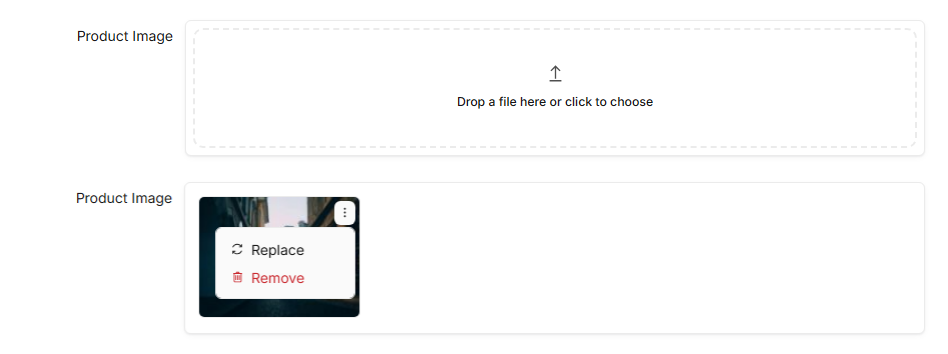
The look is in upload-drop.css, which the bundle of the common features imports, so an application that uses them gets it without a change. The texts are localizable: FileUploadTexts.DropFileHint, DropFilesHint, FileMenuHint, ReplaceButton and AddMoreButton.
The toolbar is not gone: it comes back with the toolbar option of the editor (Toolbar of the upload editor attributes), or for all editors with FileUploadEditor.defaults.toolbar = true and MultipleFileUploadEditor.defaults.toolbar = true in the script initialization. An editor whose getToolButtons adds buttons of its own keeps its toolbar too, as the built-in select file and delete buttons are the ones that the drop box and the file menu replace; then its delete button is hidden, not disabled, while there is no file.
The text of the drop box and a line under it, e.g. the kind or the maximum size of the files, are the dropHint and dropHintDetail options (DropHint and DropHintDetail of the attributes), as texts or local text keys.
Along the way:
- A file dropped or pasted into a read-only editor is ignored, as the drop zone of the uploader did not check whether its input was disabled, and so is one that finishes uploading after the editor became read-only.
- The drop zone no longer keeps its
drop-validordrop-invalidclass after a drop, as nodragleavefollows it. - The editors raise the change event when a file is uploaded, removed or deleted, so a form that tracks its unsaved changes notices it. Setting the value in code does not raise it.
Upgrading
Nothing is required. To keep the old look, set FileUploadEditor.defaults.toolbar and MultipleFileUploadEditor.defaults.toolbar to true, e.g. in Modules/Common/script-init, or add the toolbar option to the editors that should keep it.
To store thumbnails in the new size, change ThumbWidth and ThumbHeight of the UploadOptions in Modules/Common/File/FilePage.cs to 160 and 120. The thumbnails stored before keep their size; the tiles scale them to fit.
Grids on a Phone
A full height grid page (responsive-height) makes its grid as high as its rows on a screen narrower than 768 pixels, so the page scrolls instead of the grid. A grid that loads its rows as it is scrolled could not work like that: InfiniteScrollView waited for the grid to scroll, which it did not, and VirtualScrollView would have all its rows in view, and load them all.
InfiniteScrollViewnow loads the next rows as the page is scrolled near the last ones of the grid.- A grid with a
VirtualScrollViewkeeps a height of its own on a phone, so it scrolls itself. Its view says so withsupportsAutoHeight: false, and the grid gets thes-narrow-fixed-heightclass, whose height is the screen less--s-narrow-grid-offset(12rem by default). - Another grid can be as high as its rows on a phone by overriding
useNarrowAutoHeight()to return true, as the users grid does. - The pager of such a grid has no rows per page selector, as the number of the rows the view asks for at once is set by the developer (100 by default), unless
showRowsPerPageis set. A grid page with theresponsive-heightclass shows 20 rows per page on a phone only with the default paging view, so a grid that creates anInfiniteScrollViewwithgetViewOptions()still asks for 100 rows at once.
Switches
BooleanEditor has a switch option, which shows a switch instead of a checkbox for the same value:
[BooleanEditor(Switch = true)]
public bool? IsActive { get; set; }
Switches, including Bootstrap's form-switch, are a little larger than before (2.5em by 1.375em instead of 2em by 1em), so they no longer look thin next to text and buttons, and they show a pointer cursor. Their size comes from the optional --s-switch-width and --s-switch-height tokens, which the new switch.css of Serenity.Extensions reads for both the Serene and the StartSharp themes.
Texts of the Pages (StartSharp)
The texts of the pages of the feature assemblies have a root of their own, Pages., which keeps them apart from the texts of the application:
- the exception log with
Pages.Pro.ExceptionLog., - the Roles page with
Pages.Pro.Roles., - the User Management page with
Pages.Pro.UserManagement., - the My Account page with
Pages.Pro.MyAccount., - the Languages page with
Pages.Pro.Languages., - the Translations page with
Pages.Pro.Translations..
Pages is a UI key candidate (LocalText.IsLocalTextKeyCandidate) and is in LocalTextPackages.DefaultSitePackageIncludes, so these texts go to the client in the Site package and can be translated on the Translations page like the Forms. or Controls. ones. The texts that already used another root, e.g. the Site. ones of the application, keep it.
This is a breaking change for the translations that were saved for the Languages and Translations pages, which used Site.Languages. and Site.Translations. in 10.8.0: they are not used under the new keys. The other prefixes are for pages that are new in this release.
Upgrading
- Move the saved translations of the Languages and Translations pages to the new keys, on the Translations page or in the
App_Data/texts/user.texts.<language>.jsonfiles where StartSharp keeps them:Site.Languages.becomesPages.Pro.Languages.andSite.Translations.becomesPages.Pro.Translations.. The Translations page lists the new keys with the texts of this version, so nothing is lost, only unused until it is carried over. - If your application sets
Localization:Packageswith patterns of its own for theSitepackage, addPagesto them.
10.8.1 (Patch Release)
10.8.1 was a patch release between 10.8.0 and 10.9.0. It fixes several regular expressions that could take exponential time, so that a request, a code generation run or a build could hang or stall the application. Nothing in it requires application code changes.
- CSS bundles. The
@importpattern ofCssBundleBuildercould match the leading comment and whitespace run of a stylesheet in exponentially many ways, doubling with every comment that directly follows another: a 57 KB stylesheet with 28 such pairs never finished matching, so every request for a bundle that included it waited until it was abandoned or the application was restarted. The comment atom is unambiguous now, so matching is linear in the size of the file. The@import, source mapping and url rewriting patterns also have a timeout of 5 seconds as a safety net; when it is reached, the file is included as it is, with its@importstatements, and a warning is logged, as a bundle request must never hang. SettingCssBundling:ProcessImportstofalseavoids the pattern in the earlier versions. - Sergen and the source generators. The identifier pattern of
CSharpSyntaxRulesrepeated its part characters twice, so about 30 or more valid identifier characters followed by an invalid one, e.g. a long local text key segment or a module name with a space, dash or slash in it, took exponential time. It repeats them once now, so matching is linear. - Glob filters.
GlobFilterconverted**/to(.+/)*, which has exponentially many ways to split the folders of a path: a path of 30 folders that does not match took 16 seconds. It uses the equivalent but unambiguous(.+/)?now. - The TypeScript scanner of the code generator never recognized the
@ts-ignoreand@ts-expect-errorcomment directives, as the multi-line pattern was escaped twice and the single-line one required a trailing slash. Both are fixed, and the backslash loop of the multi-line pattern, which was exponential, is linear. - The in-memory list source adapter of Pro.Extensions built a regular expression from the
LIKEpattern of a list request, which took polynomial time in the length of the text for each%:%a%a%a%bagainst a text of 1000 characters took seconds, so such a request could stall the services that the adapter serves. Literals and wildcards are matched with a two-pointer matcher now, which needs at most a pass over the text for each%and never backtracks; an escaped%or_is still a literal and the comparison still ignores case unlessIsLikeCaseSensitivesays otherwise (StartSharp). - The exception log masked the value of a form field instead of its key, so the secret, e.g. the
Passwordof a login, stayed in the stored form data and the***was stored under the value. It replaces the value of the key now (StartSharp).
Tooling
- Type-checked specs. The packages with a test project have a
tsc:testscript that type-checks it (tsc -p test), and a roottsc:testruns them all with--no-bail --if-present. A test project needs no@types/nodefor that, whose globals, e.g.setTimeoutandconsole, conflict with the DOM ones:test-utils/nodedeclares only the Node APIs that the specs use (readFileSync,resolve,import.meta.dirname, …) in a module of its own. The specs of corelib, Pro.Extensions, the dashboards and dynamist packages were fixed to pass the check. - Server typings generation could fail now and then with "Operations that change non-concurrent collections must have exclusive access", as the metadata resolver of the code generator cached the resolved types and methods in plain dictionaries, which are not safe when two threads use them at once. The caches are
ConcurrentDictionarys now; resolving a type twice is harmless, so no lock is needed around the resolution.
Smaller Changes
- The search of the user list (
BaseUserListService) finds the users by their email addresses too, normalized when the row hasINormalizedEmailRow, so an administrator can find a user by the address that an invitation was sent to. - Any combobox editor can accept a value that is not one of its items with the
autoCompleteoption ofComboboxCommonOptions, which only the in-place add options declared before, e.g. aSelectEditorwhose items are suggestions. - The pages and services that are not available while impersonating show the new
Forms.Membership.Impersonation.Restrictedtext, so an application can translate it.
Smaller Fixes
- A service call that failed with an HTTP error status could not be fixed by an error recovery, e.g. the one that asks the user to confirm the password, as the recoveries were only tried for an error in a 200 response, though a validation error with the 400 status carries the same error. The failed response is read from a clone and its error is tried now, so the call is made again after the user confirms, and the response is still read to handle the error when it is not fixed.
Fluent.removethrew when it was given a value that is not an element, e.g. a text node orwindow, while jQuery is loaded, as it passed it to theremovemethod of jQuery, which expects an element; it leaves such a value alone now.- Group totals of a grid (
RemoteView) were merged into an object by their keys, so a total with a key like__proto__,constructororprototypecould change the prototype of the object; such keys are skipped now. - The interfaces that
[GenerateInterface]generates for request handlers had no nullable context, so a handler with a nullable annotation, e.g. astring?parameter, caused CS8669 warnings in the generated code. The generator takes the nullable context of the project from itsNullableproperty now, as the row fields generator does (StartSharp). TwoFactorManager.IsActiveForreturned true for a user without an active two-factor method and false for one with it.- The codes of the email and SMS two-factor authentication come from a cryptographic random number generator (
RandomNumberGenerator.GetInt32) instead ofSystem.Random, whose numbers could be predicted from the ones before them (Pro). - Sending a password reset email failed after a timeout though the email was sent, as its account event read the user while the transaction of the request locked the row of the user; the event is published after the commit now.
- The set password page was a card as high as the page, and the change password page was at the top; they are in the middle of the page, as high as their content, like the other pages of the account.
- The impersonation banner was not shown, as it read the user data before the page had it, which fetched a copy that the browser could have cached before the impersonation; it waits for the page now.
RecordViewClassdid not accept a record view with options of its own, e.g.recordViews: [{ type: MyView }], as it required the generic constructor ofRecordView(Pro).- The children of a JSX element of domwise can be any
Node, as the runtime appends any, e.g. the result of a formatter typed asNode | string, which did not compile.