Students and Enrollments
Create the Students and StudentCourses Tables
Students and their course enrollments go hand in hand, so we'll create both tables in one migration — Students for the personal info, StudentCourses to link a student to a course (and optionally a term). Putting them together means the relationships exist from the very start.
using FluentMigrator;

namespace CourseTutorial.Migrations.DefaultDB
{
    [DefaultDB, MigrationKey(20250616_1000)]
    public class DefaultDB_20250616_1000_StudentsAndStudentCourses : AutoReversingMigration
    {
        public override void Up()
        {
            Create.Table("Students")
                .WithColumn("Id").AsInt32().IdentityKey(this)
                .WithColumn("FirstName").AsString(100).NotNullable()
                .WithColumn("LastName").AsString(100).NotNullable()
                .WithColumn("FullName").AsString(201).NotNullable()
                .WithColumn("BirthDate").AsDateTime().Nullable()
                .WithColumn("DepartmentId").AsInt32().NotNullable()
                    .ForeignKey("FK_Students_DepartmentId", "Department", "Id");

            Create.Table("StudentCourses")
                .WithColumn("Id").AsInt32().IdentityKey(this)
                .WithColumn("StudentId").AsInt32().NotNullable()
                    .ForeignKey("FK_StudentCourses_StudentId", "Students", "Id")
                .WithColumn("CourseId").AsInt32().NotNullable()
                    .ForeignKey("FK_StudentCourses_CourseId", "Courses", "Id")
                .WithColumn("TermId").AsInt32().Nullable()
                    .ForeignKey("FK_StudentCourses_TermId", "Terms", "Id");

            Create.UniqueConstraint("UQ_Student_Course_Term")
                .OnTable("StudentCourses")
                .Columns("StudentId", "CourseId", "TermId");
        }
    }
}
Once the migration is applied, build the project and run Sergen for both the Students and StudentCourses tables.
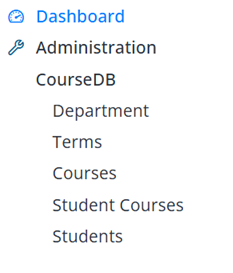
Start the application and you'll have working CRUD screens for both.
Add Some Sample Students
Let's add a few students so the master–detail screen has something to show.
Open the CourseDB → Students screen and create:
| Full Name | Birth Date | Department |
|---|---|---|
| John Smith | 2004-03-15 | Computer Science |
| Emily Johnson | 2003-07-22 | Mathematics |
| Michael Brown | 2004-11-05 | Physics |
| Sarah Davis | 2003-05-18 | Computer Science |
Note: Enter the birth dates using the same date format described for the Terms records.
The StudentCourses table is already in place from the migration, but we won't use it as a standalone screen. Instead, we'll manage enrollments inside the Student dialog using a master–detail structure:
- Students are the master records
- StudentCourses are the detail records
- Course assignments happen inside the Student dialog