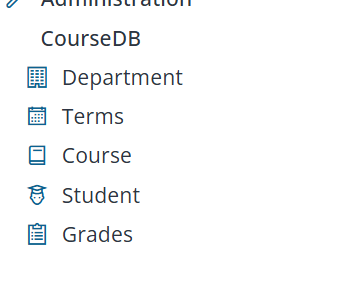
Navigation Icons and Column Headers
Give the Navigation Menu Icons
A little icon next to each menu item makes the sidebar much easier to scan. Serenity templates like Serene and StartSharp ship with the Line Awesome icon library, a modern alternative to Font Awesome. It's largely compatible with Font Awesome 4.7 class names, so you can use classes like fa-book or fa-user-graduate in your NavigationLink attributes.
Open the navigation file for your module (e.g., Modules/CourseDB/CourseDBNavigation.cs).
Note: Sergen may have already added
NavigationLinkattributes for your pages in this file. In that case, edit the existing lines to add icons rather than adding duplicate attributes — otherwise you'll end up with multiple menu entries for the same page.
Below are the NavigationLink declarations for each page, each with a section name, title, and an icon. You can find the full list of available icons and their CSS classes on this page.
using Serenity.Navigation;
using MyPages = CourseTutorial.CourseDB.Pages;

[assembly: NavigationLink(int.MaxValue, "CourseDB/Department", typeof(MyPages.DepartmentPage), icon: "fa-building")]
[assembly: NavigationLink(int.MaxValue, "CourseDB/Terms", typeof(MyPages.TermsPage), icon: "fa-calendar-alt")]
[assembly: NavigationLink(int.MaxValue, "CourseDB/Courses", typeof(MyPages.CoursesPage), icon: "fa-book")]
[assembly: NavigationLink(int.MaxValue, "CourseDB/Students", typeof(MyPages.StudentsPage), icon: "fa-user-graduate")]
[assembly: NavigationLink(int.MaxValue, "CourseDB/Grades", typeof(MyPages.GradesPage), icon: "fa-clipboard-list")]
Note: The path in each link (e.g.,
CourseDB/Courses) should match the actual page/table name. UseCoursesandStudents(plural) to match the page names, otherwise the menu item text or links will be inconsistent.
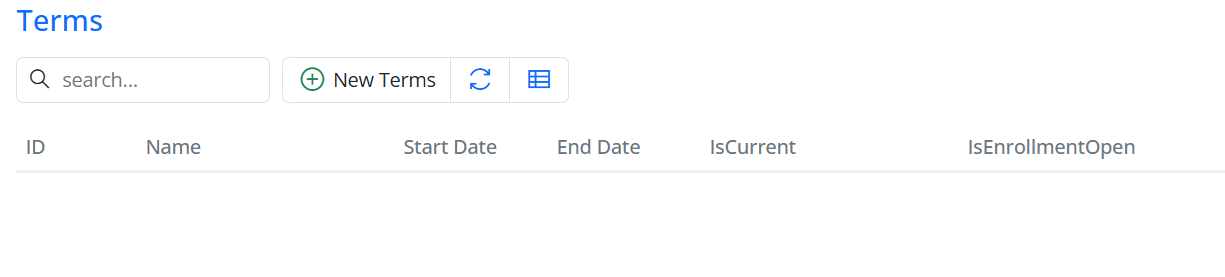
Rename a Column Header (and Set a Width)
To show a different header — or adjust the width — of a column, do it in the columns definition file (typically TermsColumns.cs) instead of editing the row class (TermsRow.cs).
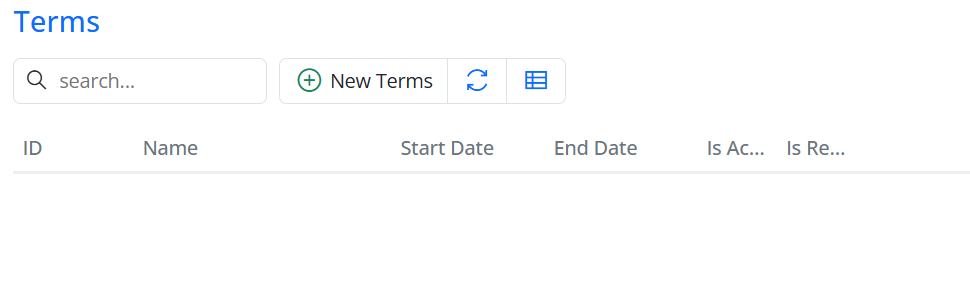
The generated TermsColumns.cs already contains every field from the row:
namespace CourseTutorial.CourseDB.Columns;

[ColumnsScript("CourseDB.Terms")]
[BasedOnRow(typeof(TermsRow), CheckNames = true)]
public class TermsColumns
{
    [EditLink, DisplayText(TextKey = "Db.Shared.RecordId"), AlignRight]
    public int? Id { get; set; }
    [EditLink]
    public string? Name { get; set; }
    public DateTime? StartDate { get; set; }
    public DateTime? EndDate { get; set; }
    public bool? IsActive { get; set; }
    public bool? IsRegistrationOpen { get; set; }
}
The attributes you add on a property here override what's on the row entity. To customize the two boolean columns, add [DisplayName], width, and alignment attributes to those properties, leaving the other columns alone:
namespace CourseTutorial.CourseDB.Columns;

[ColumnsScript("CourseDB.Terms")]
[BasedOnRow(typeof(TermsRow), CheckNames = true)]
public class TermsColumns
{
    [EditLink, DisplayText(TextKey = "Db.Shared.RecordId"), AlignRight]
    public int? Id { get; set; }
    [EditLink]
    public string? Name { get; set; }
    public DateTime? StartDate { get; set; }
    public DateTime? EndDate { get; set; }

    [DisplayText("IsCurrent"), Width(150), AlignRight]
    public bool? IsActive { get; set; }

    [DisplayText("IsEnrollmentOpen"), Width(150), AlignRight]
    public bool? IsRegistrationOpen { get; set; }
}
Important: If you replace the class with only the two boolean properties, the other columns (
Id,Name,StartDate,EndDate) will disappear from the grid. Always keep the full set of columns and only modify the attributes.